Redesigning BeatRoute's Home Experience
Problem Space
Sales productivity
Year
2025
Redesigned BeatRoute’s home experience to shift from a cluttered, feature-heavy interface to a structured, task-driven system. Introduced bottom navigation, improved information hierarchy, and enabled admin-level customization to adapt workflows across different business needs.
Scope of Work
Problem
BeatRoute’s home experience had evolved without a clear structure, resulting in a cluttered and inefficient interface for field users.
No clear primary action
Poor hierarchy made it hard to scan and prioritize
All features were given equal importance
Users had to figure out what to do next
👉 Result: Slower task completion and inefficient navigation for sales reps in the field
Context: Who is this for?
Sales Representatives
Plan and execute daily visits
Complete tasks and update data
Track performance
Managers
Monitor team performance
Track goals and progress
Nudge teams for pending work
👉 The experience needed to support both execution (reps) and monitoring (managers)
Understanding the Existing Experience
The home screen acted as a feature dump, without guiding users toward meaningful actions.
👉 Users had access to everything—but lacked clarity and direction

Key Insights
Users need clarity on what to do next
Navigation should prioritize high-frequency tasks
Too many equal-priority elements increase decision fatigue
Structure and hierarchy directly impact speed of execution
👉 The core issue was lack of task prioritization and navigation clarity
Design Direction
1. Shift from feature-heavy → task-driven
Prioritize what users need to do, not everything available
2. Create a clear navigation system
Enable fast access to core workflows
3. Improve hierarchy and focus
Guide users toward important actions first
4. Design for flexibility across organizations
Allow the system to adapt to different business priorities
What We Changed
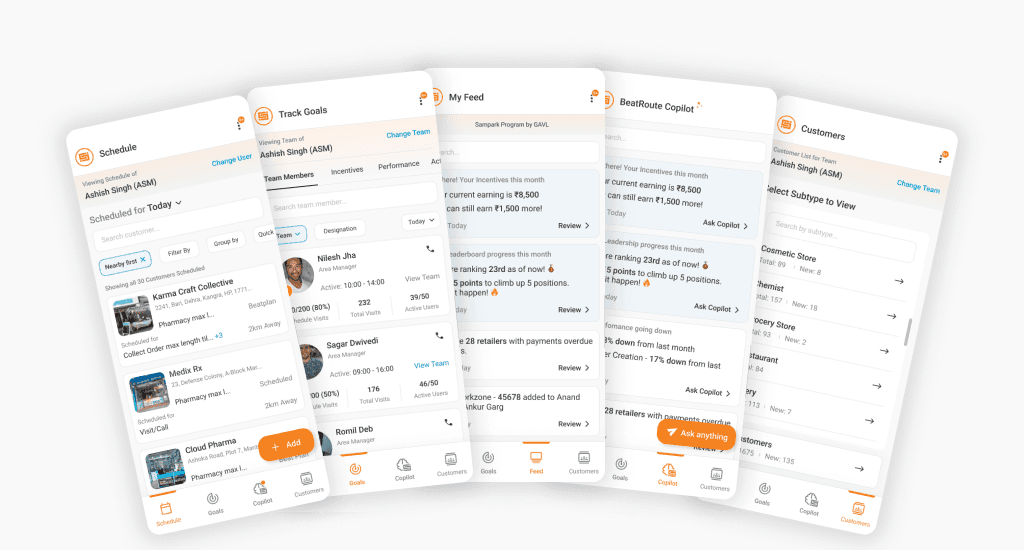
1. Introduced Bottom Navigation for Core Workflows
Problem
Users had no clear way to access key sections quickly
Solution
Introduced a bottom navigation bar focused on high-frequency tasks:
Schedule
Goals
Feed
Customers
Activities
👉 Enabled quick switching between core workflows
2. Made Navigation Configurable for Different Business Needs
Problem
A fixed navigation structure does not work across all companies. Different organizations prioritize different workflows - for example, some may focus more on “Customers” while others rely heavily on “Schedule”.
Solution
Introduced admin-level configuration to make navigation flexible:
Reorder bottom navigation tabs
Show or hide specific sections
Define default landing screens for different user roles
👉 This transformed navigation from static → adaptive and scalable

3. Structured the Experience Around User Tasks
Problem
Features were scattered and not aligned with user goals
Solution
Reorganized the product around key user workflows:
Schedule → plan and manage daily visits
Goals → track performance and targets
Customers → access profiles and take actions
Activities → complete forms and reports
Feed → view updates and notifications
👉 Shifted focus from feature discovery → task completion
4. Reimagined Notifications as a Smart Feed
Problem
Notifications were passive and disconnected
Solution
Introduced a centralized Feed system
Highlighted key updates:
Incentives earned
Leaderboard ranking
Added AI-powered Copilot (premium feature)
Users can interact with notifications
Get deeper insights through conversation
👉 Notifications became actionable and insight-driven
5. Improved Visual Hierarchy and Clarity
Problem
Flat structure made it difficult to scan
Solution
Clear grouping and sectioning
Improved spacing and layout
Focused content per screen
👉 Reduced cognitive load and improved usability
End-to-End Experience
The redesigned home experience:
Guides users toward key actions
Enables quick navigation across workflows
Adapts to different organizational needs
Impact
(Post-launch metrics not available)
Improved clarity in navigation
Faster access to core tasks
Reduced effort in identifying next actions
Key Learnings
Navigation design is critical to product usability
Prioritization matters more than feature quantity
Flexibility is essential in B2B product design