Improving Retailer Onboarding for BeatRoute
Problem Space
Retailer onboarding
Year
2025
Redesigned BeatRoute’s retailer onboarding experience for field sales reps to make it faster and more reliable in real-world conditions. Transformed complex, overloaded forms into a structured, step-based flow with progress visibility and draft saving. Focused on reducing cognitive load and enabling seamless onboarding even in low-network and interruption-prone environments.
Scope of Work
Problem
BeatRoute enables sales representatives to onboard retailers directly from the field by capturing business, KYC, and banking details.
However, the existing onboarding flow was difficult to use in real-world conditions:
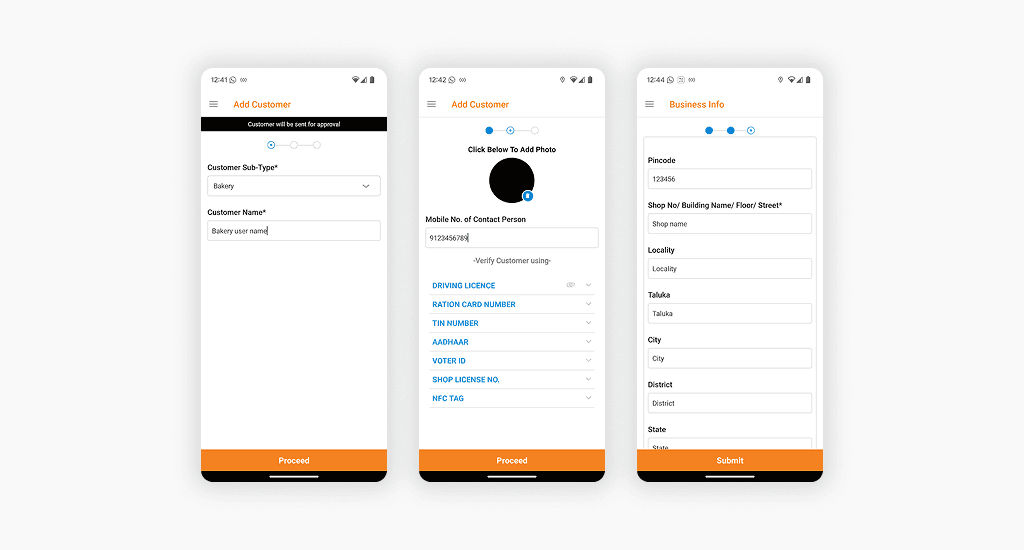
Built as 3 steps, but each step contained large, complex forms
No clear separation between different data types
No progress visibility → hard to track completion
No draft saving → interruptions meant losing all progress
👉 Result: Slow onboarding, higher drop-offs, and frustrated retailers during sign-up
Context: Real-World Usage
This flow is used by sales reps onboarding retailers in the field.
Happens on mobile devices
Often in low network areas
Retailers expect quick onboarding and can get impatient
Sales reps may get interrupted mid-process
👉 The experience needs to be fast, structured, and interruption-friendly
Understanding the Existing Experience
Although structured into 3 steps, each step was overloaded with multiple types of information.
👉 The issue wasn’t the number of steps—it was how much each step tried to do
Key Insights
Large forms increase errors and completion time
Sales reps need speed and clarity while interacting with retailers
Interruptions (network, conversation breaks) are common
Lack of structure increases mental effort and confusion
👉 The core problem was high cognitive load in a real-world, time-sensitive environment
Design Direction
1. Reduce cognitive load per step
Break complex forms into smaller, focused sections
2. Make progress visible
Ensure reps always know where they are in the process
3. Design for field conditions
Support low network, interruptions, and quick interactions
What I Changed
1. From 3 Heavy Steps → Structured Multi-Step Flow
Problem
Too much information per screen made onboarding overwhelming
Solution
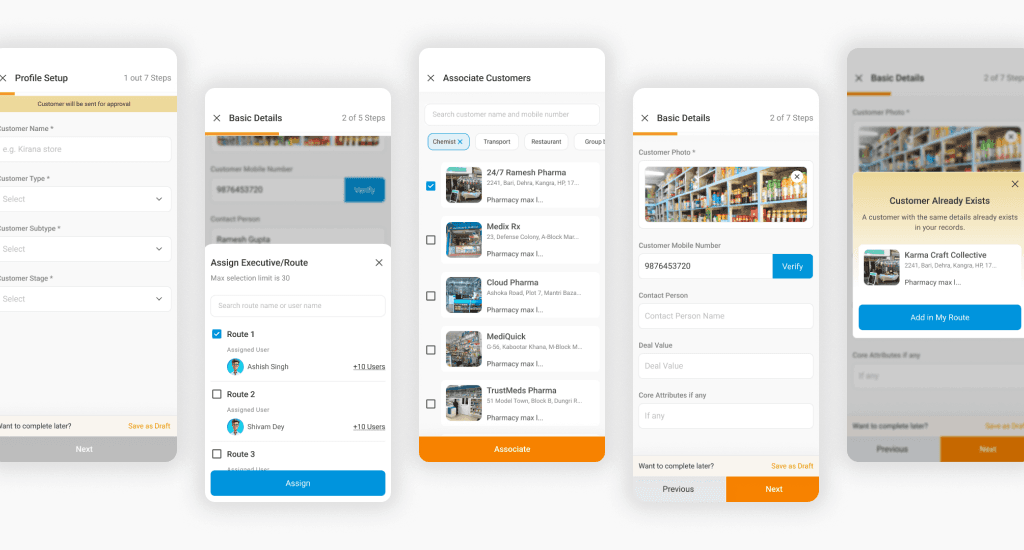
Split the flow into smaller, logically grouped steps:
General Profile
Basic Details
Address
ID Documents (Aadhar, PAN, GST, etc.)
Bank Details
Additional Details
👉 This reduced cognitive load and made the process easier to navigate
2. Clear Information Grouping
Problem
Mixed data types slowed down form completion
Solution
Each step now focuses on one category of information, aligned with how sales reps naturally collect data
👉 Faster input, fewer errors, better clarity
3. Progress Visibility
Problem
Sales reps couldn’t track how much was left
Solution
Step indicator (e.g., Step 2 of 7)
Visual progress feedback
👉 Improved confidence and flow continuity
4. Draft Saving (Critical for Field Use)
Problem
Any interruption led to loss of progress
Solution
Introduced Save as Draft
Resume onboarding anytime
👉 Enables flexibility in low network conditions and real conversations
5. Improved UI for Speed and Clarity
Problem
Dense layouts slowed down data entry
Solution
Cleaner layouts and spacing
Clear input hierarchy
Better visual grouping
👉 Faster scanning and reduced input errors
End-to-End Experience
The redesigned onboarding:
Breaks complexity into clear, manageable steps
Supports on-the-go usage in real conditions
Enables faster and more reliable retailer onboarding
Impact
(Based on implementation and expected outcomes)
↓ Drop-offs during onboarding
↓ Time to onboard a retailer
↓ Data entry errors
↑ Completion rate
↑ Sales rep efficiency → faster retailer activation
Key Learnings
Reducing steps isn’t always the solution - reducing cognitive load is
Designing for real-world conditions (network, interruptions, user behavior) is critical
Structuring information correctly can significantly improve speed and accuracy